What Secretly Slows Down Your Smart Home Automations (And How to Speed Things Up)
The key idea: smart home automation speed is rarely controlled by one component. A motion sensor can detect an event quickly, yet the light may still respond slowly because the event crosses a crowded wireless link, waits for a retry, travels through a hub, triggers several rule checks, reaches a cloud service, and finally wakes or commands the device. Treating the whole path as one system makes troubleshooting much more effective.
Start With the Whole Automation Path
When a routine feels slow, the first mistake is to blame the smart home hub. The hub is visible and central, but it is only one stage in a distributed system. A typical motion-triggered lighting routine can involve the sensor detecting movement, the sensor transmitting an event, a wireless network forwarding it, a coordinator or hub receiving it, an automation engine evaluating conditions, a command being sent to the light, and the light itself changing state.
Some systems add a cloud service between these stages. Others keep most or all of the logic on the local network. The difference matters because every additional communication boundary creates another place where connection establishment, queueing, processing, retransmission, or service availability can affect the observed response.
NIST's work on IoT network behavior makes an important diagnostic point: understanding what a device normally communicates is useful before deciding whether a network behavior is abnormal. In practical terms, that means measuring or observing the actual path instead of assuming that a slow automation is automatically a weak Wi-Fi signal. [NIST IR 8349] r7
Why Wireless Interference Can Look Like a Slow Automation
A wireless network does not need to fail completely to create noticeable automation delay. A packet can be lost, corrupted, or delayed and then transmitted again. From the user's perspective, the result may simply look like a light that takes an extra second to react or a door notification that arrives inconsistently.
Many home automation technologies operate in crowded radio environments. The IEEE study on LowPAN coexistence examined home and laboratory conditions involving Wi-Fi, wireless routers, microwave ovens, obstacles, and other sources of interference. Its findings show that common household radio conditions can affect communication efficiency and packet delivery. [IEEE LowPAN study] r8
This is why a sensor that works perfectly when tested beside a hub can behave differently when installed behind a refrigerator, across several rooms, near a dense collection of wireless equipment, or at the edge of a mesh. Distance is only one variable. Walls, metal, appliance placement, channel use, competing transmissions, and mesh topology can all change the effective reliability of a wireless path.
Situation-specific rule: if delays are intermittent and become worse at particular locations or times, investigate the radio environment before rewriting the automation. If the delay is consistent regardless of location and network conditions, look farther upstream or downstream in the automation path.
Retries Are a Hidden Source of “Random” Delay
Retries are useful because they improve reliability. They are also a source of latency when the first attempt does not succeed. This creates a useful distinction: a network can be reliable on average while still feeling slow during individual events.
Consider a contact sensor that sends an open event. If the first transmission succeeds, the automation may proceed immediately. If the radio link is marginal, the event may require another attempt. If several network layers perform their own reliability handling, the delay can become less predictable. The resulting symptom is not necessarily “the network is down.” It is often “sometimes it is instant, sometimes it takes noticeably longer.”
Protocol design matters here. MQTT, for example, defines different delivery guarantees. QoS 0 provides at-most-once delivery without a retry exchange, while QoS 1 adds acknowledgement behavior and QoS 2 provides a stronger exactly-once delivery process. The appropriate level depends on the application, but stronger delivery guarantees can involve additional protocol work. r9
That does not mean reliability settings should simply be disabled. For a temperature display, losing an occasional reading may be tolerable. For an automation where a missed event creates a meaningful problem, reliability may matter more than minimum latency. The correct response is to understand the trade-off rather than treating every extra protocol exchange as a defect.
Cloud Round Trips Can Add a Separate Delay Layer
A local automation and a cloud-dependent automation can produce the same visible action while taking very different paths. In a local design, a sensor event may reach a hub, be evaluated, and produce a command without leaving the home network. In a cloud-dependent design, the event can travel from the home to a remote service, be processed there, and then return as a command.
Internet speed is therefore not the same thing as automation responsiveness. A fast broadband connection can still have variable round-trip time, congestion, routing changes, service-side queues, authentication steps, or temporary cloud availability problems. Conversely, a local automation can remain responsive during an internet outage if its devices and logic are genuinely local.
NIST's consumer-router work reinforces why the router deserves to be treated as part of the smart-home architecture rather than as an unrelated appliance. Home IoT devices depend on network infrastructure for connectivity, and the router is part of the environment in which those devices communicate. [NIST IR 8425A] r10
Hub Processing and Automation Rules Can Become the Bottleneck
A hub can receive an event quickly and still take time before issuing the final command. Automation systems often evaluate several conditions: time windows, occupancy states, modes, previous events, device availability, schedules, and dependencies between actions. A routine can therefore contain a software queue even when the network is healthy.
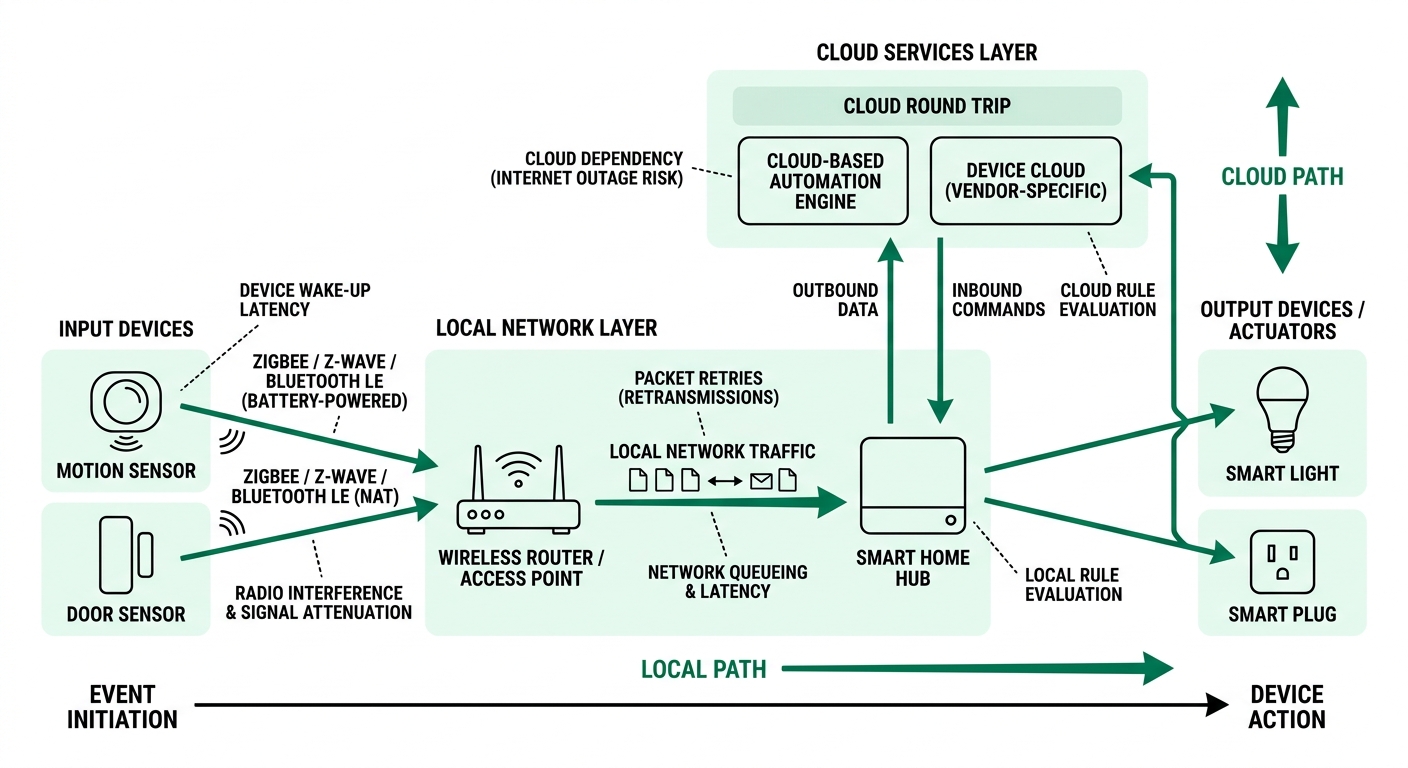
Recent systems research makes this distinction explicit. The 2026 USENIX RASC work on smart spaces focuses on observability, action completion, dependencies, and scheduling, and evaluates scheduling policies for home automations. The research treats an IoT action as something that has multiple meaningful stages rather than a single instantaneous command. [USENIX RASC] r11
This is particularly relevant when an automation contains several sequential actions. Suppose a routine detects motion, checks occupancy, turns on a light, waits, starts a fan, checks a temperature condition, and then adjusts another device. If each step waits for the previous step to complete, a delay in one device can propagate through the entire routine.
If one simple rule is slow but other automations are fast, inspect that rule first. If many unrelated automations become slow simultaneously, a shared dependency such as the network, hub, coordinator, or cloud service becomes more plausible.
Polling, Event Reporting, and Sensor Wake-Up Matter Too
Not every sensor reports a state change immediately. Some devices are designed around low power and wake periodically. Others report events promptly but use a configured reporting interval for measurements. A temperature sensor that updates every few minutes is not necessarily malfunctioning because a dashboard does not change instantly after a small temperature change.
This distinction is especially important when troubleshooting battery-powered sensors. A device may intentionally spend most of its time asleep, wake to measure, decide whether a report is necessary, and then transmit. That architecture reduces energy use but can conflict with expectations created by mains-powered devices.
The useful diagnostic question is therefore not simply “How fast is the sensor?” Ask instead: “What event should cause a transmission, and when should that transmission be expected?” A door contact configured for event reporting should be evaluated differently from a periodic environmental sensor.
If the sensor itself reports late, changing the hub's automation rule may accomplish nothing. If the sensor event appears immediately in the hub but the actuator changes later, shift attention toward the network after the hub, rule evaluation, cloud dependencies, or the actuator.
Use a Layered Table Before Changing Settings
The table below is intentionally diagnostic rather than prescriptive. Its purpose is to connect observable symptoms with plausible mechanisms while avoiding the common mistake of changing several variables at once.
Self-Check: Find the First Point Where Time Disappears
The most useful troubleshooting habit is to identify the first timestamp that becomes unexpectedly late. You do not need laboratory equipment to begin. Many automation platforms expose event histories, device logs, network statistics, or automation traces.
- Trigger one repeatable event. Use the same door, motion sensor, button, or other trigger several times.
- Record the trigger time. Establish when the physical event actually occurred.
- Check when the hub received it. A gap here points toward the sensor or communications path.
- Check when the rule started. A gap after receipt points toward automation processing, conditions, scheduling, or a service dependency.
- Check when the command was issued. A late command suggests a rule or controller issue rather than an actuator issue.
- Check when the device acknowledged or completed the action. A late final state can indicate actuator behavior, device wake-up, or another device-specific delay.
- Repeat under different conditions. Compare the result with the device nearby, during a quiet period, and with a simplified rule if those tests are safe and practical.
NIST's methodology for characterizing IoT network behavior supports this general evidence-first approach: capture and document expected communication behavior rather than treating a device's network activity as a black box. [NIST IR 8349] r12
Three Practical Action Thresholds
There is no universal “acceptable” smart-home latency. A half-second response may be unnoticeable in one routine and frustrating in another. A temperature logging automation can tolerate delays that would be undesirable in an interactive light or door-control routine.
Use the following thresholds as diagnostic logic rather than as hard engineering specifications:
- If the delay is consistent: look for a fixed stage such as cloud processing, polling intervals, rule delays, device wake behavior, or a deliberately configured wait.
- If the delay is intermittent: investigate retries, radio conditions, congestion, service variability, device availability, and queueing.
- If the delay affects many unrelated automations simultaneously: inspect shared infrastructure first—the router, hub, coordinator, network path, or external service.
- If only one sensor is affected: start with that sensor's power, placement, reporting configuration, and link quality rather than rebuilding the entire automation system.
- If a simplified local rule responds promptly: compare it with the original rule to identify the added condition, service, dependency, or action that introduces the delay.
The important threshold is not an arbitrary number of milliseconds. It is the point at which you have enough evidence to identify the first slow stage. Once that stage is isolated, the next change can be narrow and reversible.
Reliability and Speed Are Sometimes Competing Goals
Fast is not always better. A system that immediately issues a command but occasionally loses an important event can be worse for a particular use case than a system that waits for confirmation.
MQTT illustrates this principle clearly. Its QoS levels represent different delivery guarantees, from at-most-once to exactly-once delivery. The standard deliberately provides choices because IoT applications have different requirements. r13
The same trade-off appears elsewhere. A mesh route with more redundancy may provide better coverage while adding communication hops. A cloud service may provide features unavailable locally while adding an external dependency. A battery-powered sensor may conserve energy by sleeping rather than maintaining continuous responsiveness. A rule may include a confirmation step because the designer values certainty over minimum delay.
That means a faster response should not be pursued by blindly removing safeguards, confirmations, retries, or reliability features. The right question is whether the added delay is serving a purpose that matters for that particular automation.
When Network Changes Are Not the Right Fix
It is tempting to replace a router, move the hub, change wireless channels, or add repeaters whenever an automation feels slow. Those changes can help, but they can also distract from a software problem.
For example, if a sensor event is visible in the hub immediately but the light waits several seconds before changing, improving the sensor's radio link may have little effect. The evidence already shows that the event reached the controller. In that case, inspect the rule, its dependencies, its execution queue, and whether the action is being routed through a cloud integration.
The reverse is also true. If event timestamps show that the sensor reaches the controller late, simplifying the automation may not address the cause. In that situation, inspect wireless placement, interference, mesh routing, device power, and network behavior.
NIST's home-IoT guidance also emphasizes understanding which communications a device actually needs. That perspective is useful for troubleshooting because unexpected traffic, unnecessary dependencies, or poorly understood network paths can complicate both performance and security analysis. [NIST SP 1800-15] r14
Practical Action Checklist
- ☐ Reproduce the delay with the same trigger several times.
- ☐ Determine whether the sensor event itself is late.
- ☐ Compare hub receipt time with physical trigger time.
- ☐ Check whether the automation rule contains intentional waits or sequential dependencies.
- ☐ Test a minimal local trigger-to-action rule when possible.
- ☐ Check whether the affected devices depend on a cloud service.
- ☐ Inspect wireless conditions if delays vary by room or time.
- ☐ Check battery or power conditions on affected sensors.
- ☐ Review hub, coordinator, router, and automation logs for the same event.
- ☐ Change one variable at a time and repeat the same test.
- ☐ Preserve reliability settings when they serve a meaningful purpose.
- ☐ Stop changing network hardware once evidence points to the rule or actuator layer.
Who This Troubleshooting Method Is For—and Who Should Stop Earlier
This layered method is useful for ordinary home automation problems where a user can safely inspect logs, event histories, device placement, and basic network behavior. It is especially helpful when symptoms are inconsistent and the cause is not obvious.
It is less appropriate to experiment aggressively with safety-critical systems, access controls, alarms, medical monitoring equipment, or electrical systems where an incorrect change could create a hazard. For those applications, the relevant manufacturer's documentation, professional installation requirements, or applicable safety procedures should take precedence over general latency optimization.
There is also a practical stopping point. If the evidence shows that a particular third-party service introduces unavoidable delay and the automation is noncritical, spending hours optimizing the local Wi-Fi network may not provide meaningful benefit. If the delay affects a safety-relevant function, however, the same finding can justify redesigning the dependency rather than simply accepting the latency.
FAQ: Smart Home Automation Speed
Why is my smart home automation sometimes fast and sometimes slow?
Variable delay usually suggests a variable condition rather than a permanently slow component. Wireless interference, retransmissions, network congestion, device availability, cloud service response, and controller queues can all vary from event to event. Start by comparing timestamps to find the first stage where the delay appears.
Does a faster internet connection make local automations faster?
Not necessarily. If the automation remains entirely on the local network, internet bandwidth may have little direct effect on its response time. If the automation depends on a cloud service, internet latency and external service behavior become more relevant. A wired or local test can help distinguish these cases.
Can too many smart home devices slow down automations?
They can contribute under some architectures, but device count alone does not prove the cause. More devices can increase network traffic, coordination work, event processing, and opportunities for interference or queueing. NIST recommends characterizing IoT network behavior rather than assuming that every connected device generates the same type or volume of traffic. r15
Can Wi-Fi interfere with Zigbee?
It can. Zigbee and Wi-Fi can operate in overlapping portions of the 2.4 GHz band, and research has documented the effects of household wireless interference and obstacles on low-power wireless communication. The practical symptom can be reduced packet delivery efficiency and therefore additional delay or inconsistent response. r16
Should I move every automation to local control?
No universal rule supports that conclusion. Local control can remove an external round trip, but some integrations require cloud services and some local implementations have their own limitations. If a local version is available, compare the two paths using repeatable timestamps rather than assuming that one architecture is always faster.
Can a smart home hub itself be the bottleneck?
Yes, but the evidence should point there before the hub is blamed. If events arrive promptly but commands are delayed across several unrelated automations, controller processing, scheduling, dependencies, or queues deserve attention. If only one device is slow, the actuator or its integration may be more relevant.
Do stronger reliability settings always make automations slower?
Not always, but stronger delivery guarantees can require additional exchanges or processing. MQTT defines several QoS levels specifically because applications have different reliability requirements. A small amount of added protocol work can be worthwhile when losing an event would be more harmful than waiting for confirmation. r17
What is the fastest way to find the bottleneck?
Find the first timestamp that is unexpectedly late. Compare the physical trigger, sensor transmission, hub receipt, rule execution, command issuance, and device completion. That turns a vague “smart home is slow” complaint into a specific layer that can be tested independently.
Conclusion: Speed Comes From Removing the Right Delay, Not Every Delay
A responsive smart home is not simply a collection of fast devices. It is a chain in which sensing, wireless transport, routing, controller processing, automation logic, external services, and actuation interact. The slowest-looking part is not necessarily the source of the delay.
The evidence suggests a more disciplined approach: characterize the communication path, distinguish intermittent delay from fixed delay, account for radio interference and retries, identify cloud dependencies, and inspect automation scheduling separately from device communication. Research on IoT network behavior supports observing what devices actually communicate; wireless coexistence studies show why the radio environment matters; protocol standards demonstrate the trade-off between delivery guarantees and protocol work; and recent smart-space research shows why action scheduling and completion deserve their own layer of observation.
The practical lesson is simple: if the event arrives late, investigate the sensor or network; if it arrives promptly but the rule starts late, investigate the controller and automation logic; if the command is issued promptly but the device reacts late, investigate the actuator. That decision path is more useful than repeatedly replacing hardware because a routine “feels” slow.
In other words, speeding up smart home automation is usually an exercise in removing the right delay while preserving the reliability, security, and intentional safeguards that the automation was designed to provide.
Evidence Used for This Editorial
This article synthesizes public technical and research documents rather than product marketing claims. The evidence base includes NIST publications on IoT network behavior, home IoT networking, and consumer routers; the OASIS MQTT 5.0 standard; an IEEE study of low-power wireless coexistence in home environments; and a 2026 USENIX study of observability and scheduling for smart-space actions. These sources establish mechanisms and diagnostic principles, but they do not imply that every smart-home platform will exhibit the same latency profile.


Comments
Post a Comment